WINDOWS SOFTWARE FOR SEO PROFESSIONALS AND AGENCIES

Automated website visits.
Run and review them on Windows.

Import URLs or keywords from Excel. AutoTraffic opens browsers using your settings and records the results, so you can review each visit and find records that need attention.

You run the software on your own computer. Automated visits are not real customers or leads, and do not guarantee better search rankings.

Create an account → Verify your email → Install and activate on Windows.

✓ Windows 10/11 · 64-bit✓ 1 device · up to 5 trial browsers✓ Optional proxies, not included in the software plan
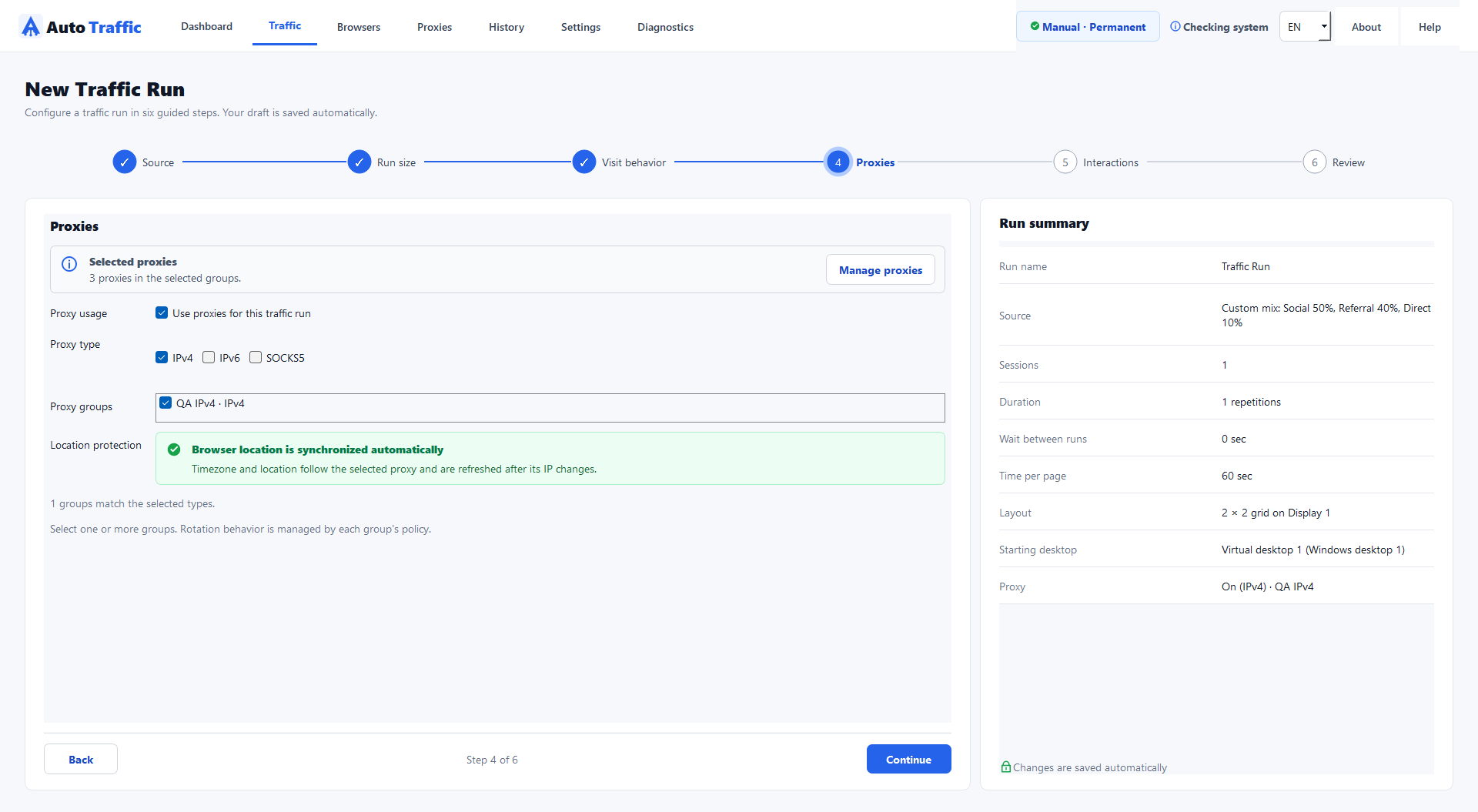
AutoTraffic run configuration on Windows
AutoTraffic interface on Windows.
AutoTraffic run configuration on Windows
TWO PRACTICAL USE CASES

A workflow for the data
you manage.

Choose a guide for your work: review keywords and links, or organize data and runs for multiple projects.

FOR SEOERS

Review keywords and links with context.

Manage URLs and keywords in Excel or the app. Review record statuses and compare available Google observations using the same country and device. Missing results or CAPTCHA are not a measured ranking of zero.

Understand traffic (Vietnamese) →
FOR AGENCIES

Keep preparation and handover clear.

Group data and proxies, choose a suitable run size, review History and export data before making wider changes. Data filters organize work; they are not client access controls.

Agency workflow (Vietnamese) →
VIDEO WALKTHROUGHS

See the actual workflow before you start.

See how to import data, launch Chrome and read results. Start with the SEOer or agency video. Vietnamese narration and captions.

These existing demonstrations are in Vietnamese.

6 TRAFFIC SOURCES

A different path to your content.

Choose how the browser reaches your website or video. Each source uses its own input data and workflow.

01

Google Search

Search on Google

Search a keyword on Google, find the matching result and open the destination page.

Prepare: A keyword and target website.

02

Social

From social media

Open a social post or page, find an existing link and follow it to the target website.

Prepare: A source-page URL and target website.

03

Referral

From another website

Open a website, blog or forum, find the specified link and follow it to its destination.

Prepare: A source URL and the link to find.

04

Direct

Open a URL directly

Open the URL you provide without a search or a referring page.

Prepare: The page URL to visit.

05

YouTube / Shorts

Videos and Shorts

Open a selected video, or browse videos from your configured source, for the chosen duration.

Prepare: A video URL or a source to browse.

06

TikTok

Videos and the feed

Open a selected video, or browse the feed from your configured source, for the chosen duration.

Prepare: A video URL or a source to browse.

Use the Excel template for each source; review actual outcomes in History.

See the workflow for each source →
DATA · SETUP · RESULTS

Prepare your data.
Run and review the results.

Import data, select a source and configure a small run. Open History afterwards to review completed and incomplete visits.

⌁

Proxy groups.

Use compatible IPv4, IPv6 and SOCKS5 inputs. Proxies are optional and are not included in the software plan.

See workflow →
◈

Configurable behavior.

Set visit duration, scrolling and navigation. Review the reason when a visit cannot complete.

See workflow →
▦

Desktop and mobile simulation.

Use the supported Chrome Desktop, Android simulation and Firefox Desktop workflows. Capacity depends on your computer, proxies and destination.

See workflow →
◌

Data statuses.

Find unavailable records and edit or disable the relevant data.

See workflow →
◇

History and Excel export.

Review runs and export app data using its templates. An Excel export is not a complete backup of the application.

See workflow →
READ RESULTS, DO NOT GUESS

Every visit has a status.
Know the next step.

A finished run does not mean every visit reached its destination. Use history and data status to decide whether to fix a URL, change sources or adjust settings.

Did it reach the destination?

Separate completed visits, missing links and access failures.

Was a result measured?

Compare like-for-like observations; keep unavailable results and their reasons separate.

What needs attention first?

Correct data and start small before increasing browser concurrency.

THE RIGHT WORKFLOW FOR EACH SOURCE

Choose a source.
Understand its workflow.

Choose a source to see how to prepare and review results in the app.

Use only data and destinations you own or are authorized to work with. Automated Google queries require appropriate permission. A requested country is not proof of the proxy’s verified location.

Source: Google SearchPreviewing
1
STEP 1Read the keyword and destination
↓
2
STEP 2Open Google with the selected settings
↓
3
STEP 3Find and open the matching result
↓
4
STEP 4Record results / rankings when measured
✓
REVIEW RESULTSReview each visit in the application History.
A CLEAR WORKFLOW

From trial access
to your first run.

01

Create an account

Register and verify your email to get your 7-day trial access.

02

Install and activate

Open Software in your account, install AutoTraffic on Windows and enter your activation code.

03

Prepare a small test run

Download the Excel template, import suitable data and choose a source and small scale in the app. Proxies are optional.

04

Run and review results

Observe the browser, open History and check data statuses. Adjust your settings before increasing browser concurrency.

AFFILIATE PROGRAM

Introduce AutoTraffic.
Earn 20% commission.

Earn 20% of eligible net subscription revenue from referred customers for 12 months. The system uses 30-day first-touch attribution, provides transparent tracking and holds commissions for 30 days before payout eligibility.

Join the affiliate program →
01

Track clicks and attributed customers

02

Commission on eligible first orders and renewals

03

Balances below the threshold roll over

ACCESS PLANS

Choose access
for the way you work.

Compare the current plans, duration, device allowance and concurrent-browser limits below. Proxies are supplied separately.

7 days free

Trial

  • ✓ 1 device · up to 5 concurrent browsers
  • ✓ All 6 sources, proxies, fingerprints, grid and browser tests
  • ✓ Full Insights and history · up to 24 hours offline
Start trial →
$19 / month

Professional

  • ✓ 2 devices · up to 20 concurrent browsers
  • ✓ Full proxy groups, Insights and browser tests
  • ✓ View annual pricing in your account
Choose Professional →
$59 / month

Business

  • ✓ 5 devices · up to 50 concurrent browsers
  • ✓ Multi-device operation · priority support
  • ✓ View annual pricing in your account
Choose Business →

Trial limits time and scale, not core operating quality. Choose monthly billing or save with an annual plan.

INCLUDED IN ALL 3 PLANS

The same toolkit. Choose the scale you need.

Trial, Professional and Business include the core features below. Plans differ in duration, device allowance, concurrent browsers and support benefits.

6 traffic sources

Google Search, social networks, referrals, direct URLs, YouTube/Shorts and TikTok.

Desktop & Mobile

Chrome and Firefox on Desktop; Android phone simulation through Chrome on your Windows PC.

Proxy & data

Import traffic data, manage proxy groups and check readiness before running.

Per-browser behavior

Configure dwell time, scrolling and navigation; each browser has its own run cycle and delay.

Grid & history

Arrange browser windows in a grid; track progress, results and run history.

Diagnostics & support

Browser Tests retain results and screenshots; export technical logs for support when problems arise.

SEO & TRAFFIC RESOURCES

Practical guidance for better traffic operations.

These guides are written in Vietnamese.

Guides (Vietnamese) →
WINDOWS DESKTOP APPLICATION

Operate directly
on your own device.

A Windows 10/11 64-bit computer and an internet connection. Available capacity depends on the device and the workload.

✓ Chrome Desktop and Android Mobile Simulator✓ App-managed Firefox runtime✓ Runtime data outside the install directory
Recommended setupA baseline for stable multi-browser operation

Operating systemWindows 10/11 64-bit✓

CPU4 cores or more✓

Memory8 GB RAM or more✓

Storage10 GB free SSD space✓

BrowsersChrome and Firefox supported✓

FREQUENTLY ASKED QUESTIONS

Know what to expect
before you begin.

Results depend on source data, hardware, proxies and live website conditions.

Contact support →

No. AutoTraffic runs automated browser visits. They are not people, leads or guaranteed sales.

No improvement is guaranteed. Keep automated activity separate from genuine organic-acquisition reporting.

No. They are optional inputs supplied separately. A successful connection and a verified location are different results.

Create an account, verify your email, then install and activate the Windows app. Start with a small run and review its results.

7-DAY WINDOWS TRIAL

Try the workflow
on your Windows computer.

Register, verify your email, then install and activate on Windows.

Start a free 7-day trial →Windows 10/11 · 64-bit · 7-day trial